Database Repository Setup
Multi User Repository Setup
The best way to run Tosca is to use a multi user repository to do so either of the following links will help you get setup.
Preparing an MSSQL server for use with Tosca Commander: https://documentation.tricentis.com/tosca/1510/en/content/installation_tosca/prepare_mssql.htm
Preparing an Oracle Server for use with Tosca Commander: https://documentation.tricentis.com/tosca/1510/en/content/installation_tosca/prepare_oracle.htm
Once you have everything setup accordingly you will then need to download and create a new workspace
Creating a new Repository For Tosca.
Load Tosca Commander
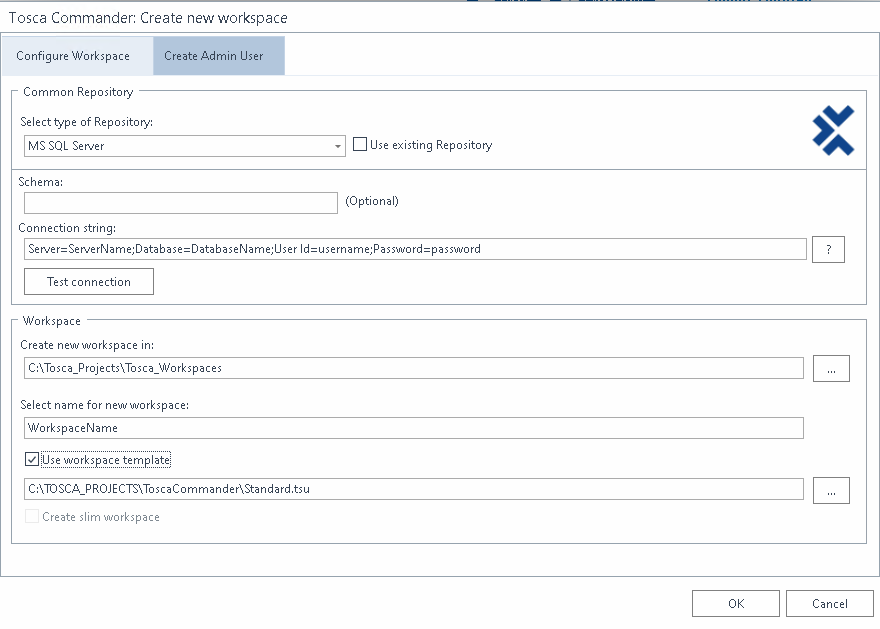
Click on the Create New button to create a new workspace

Fill in the appropriate information
| Input | Value |
|---|---|
| Select Repository Type | MS SQL Server |
| Use Existing Repositry | Uncheck (create new workspace, and new repository in msssql) |
| Connection string | Server=ServerName;Database=DatabaseName;User Id=UserName;Password=password; (No Quotes are needed here) |
| Select Namespace | Name Tosca |
| Use Workspace Template | Check (This will add standard modules (tbox) ) |